<?xml version="1.0" encoding="utf-8"?><feed xmlns="http://www.w3.org/2005/Atom" ><generator uri="https://jekyllrb.com/" version="3.10.0">Jekyll</generator><link href="http://blog.burnthe.dev/feed.xml" rel="self" type="application/atom+xml" /><link href="http://blog.burnthe.dev/" rel="alternate" type="text/html" /><updated>2026-04-10T01:54:21+00:00</updated><id>http://blog.burnthe.dev/feed.xml</id><title type="html">carterburn</title><subtitle>My personal page</subtitle><author><name>Carter Burn</name></author><entry><title type="html">New Series: Let’s Build a Simple Database…in Rust</title><link href="http://blog.burnthe.dev/foundrydb-intro/" rel="alternate" type="text/html" title="New Series: Let’s Build a Simple Database…in Rust" /><published>2026-04-09T00:00:00+00:00</published><updated>2026-04-09T00:00:00+00:00</updated><id>http://blog.burnthe.dev/foundrydb-intro</id><content type="html" xml:base="http://blog.burnthe.dev/foundrydb-intro/"><![CDATA[<p>Hey, all! Back at it again trying to write posts. While I do believe the Roundup
posts are great and will hopefully force me to stop coding and write about what
I’m doing, I wanted to come up with a solid series of developing something from
scratch. I’ve been intrigued by databases and their internals for awhile now and
one of the more fascinating posts that I have read about database internals is
from <a href="https://cstack.github.io/db_tutorial/">cstack on Github</a>. That tutorial
walks you through making a minimal sqlite clone in C. I have written a fair bit
of C in my time (refer back to the <a href="/about">about</a> page on offensive security
tools, they are predominantly in C) and even started working through the code
but I eventually plateaued and stopped working through it. I thought a way to
motivate me to get through it and really learn was to write that clone in Rust
with all of the challenges of the borrow checker, ownership, and the like.</p>

<p>The plan is to try to follow the tutorial’s fifteen parts as closely as
possible, but in Rust. I’m also going to attempt to avoid dependencies at all
costs for two reasons:</p>

<ol>
  <li>SQLite itself prides itself on minimal dependencies. I’ve heard on a podcast
with the creator that with no dependencies comes freedom to do what you want;
it’s like backpacking in the wilderness, you’re all on your own.</li>
  <li>Using something like the <code class="language-plaintext highlighter-rouge">BTreeMap</code> in the Rust standard library feels like
cheating. We have to struggle through this!</li>
</ol>

<h2 id="extensions">Extensions</h2>
<p>I plan to make a few extensions to the original at the end (if I’m up for it).
One of them would be to add the Write Ahead Log (WAL) functionality of SQLite.
This functionality is a key component of allowing SQLite to be distributed (many
distributed SQLite extensions and components leverage the WAL). With that, I may
be able to tie together my Raft implementation with this small sqlite clone.</p>

<p>I’m going to try to do my best and make it close to SQLite. I know I won’t get
there but the tutorial seems to focus in on the key components of SQLite and I
may want to add some of the other features.</p>

<p>Other extensions are in my mind as well (maybe some python bindings to allow the
use of this clone within python) and will be explored as we make our way
through.</p>

<h2 id="table-of-contents">Table of Contents</h2>
<p>Here is the table of contents for the entire series. I wanted this to be higher
in the post. See below this section for Getting Started!</p>

<p>These are going to take the form of the original series by cstack mostly. More
will be added as we work our way through.</p>

<ol>
  <li><a href="/foundrydb-part1">Part 1 - SQLite Introduction and Setting up the REPL in fdb</a></li>
  <li>TBD</li>
</ol>

<h2 id="getting-started">Getting Started</h2>
<p>To get started, I’m going to create a new Rust crate. I’ll start by creating
this as a library with a binary for a command line tool (like the <code class="language-plaintext highlighter-rouge">sqlite3</code>
binary you can use to view SQLite databases from the command line). The purpose
for this is extensibility with potential future extensions. It makes it a lot
easier to start with a library and port that than try to undo a binary.</p>

<p>We’re calling this FoundryDB (foundry -&gt; Rust get it?):</p>

<div class="language-bash highlighter-rouge"><div class="highlight"><pre class="highlight"><code>cargo new foundrydb <span class="nt">--lib</span>
<span class="c"># get the simple binary file created</span>
<span class="nb">touch </span>src/main.rs
</code></pre></div></div>

<p>Then, update Cargo.toml to look like this:</p>
<div class="language-toml highlighter-rouge"><div class="highlight"><pre class="highlight"><code><span class="nn">[package]</span>
<span class="py">name</span> <span class="p">=</span> <span class="s">"foundrydb"</span>
<span class="py">version</span> <span class="p">=</span> <span class="s">"0.1.0"</span>
<span class="py">edition</span> <span class="p">=</span> <span class="s">"2024"</span>

<span class="nn">[lib]</span>
<span class="py">name</span> <span class="p">=</span> <span class="s">"foundrydb"</span>
<span class="py">path</span> <span class="p">=</span> <span class="s">"src/lib.rs"</span>

<span class="nn">[[bin]]</span>
<span class="py">name</span> <span class="p">=</span> <span class="s">"fdb"</span>
<span class="py">path</span> <span class="p">=</span> <span class="s">"src/main.rs"</span>

<span class="nn">[dependencies]</span>
</code></pre></div></div>

<p>I’ll leave the default <code class="language-plaintext highlighter-rouge">lib.rs</code> code of <code class="language-plaintext highlighter-rouge">add</code> and add some scaffolding to
<code class="language-plaintext highlighter-rouge">src/main.rs</code> to make sure they’re playing nice.</p>

<p>In <code class="language-plaintext highlighter-rouge">src/main.rs</code>:</p>
<div class="language-rust highlighter-rouge"><div class="highlight"><pre class="highlight"><code><span class="k">use</span> <span class="nn">foundrydb</span><span class="p">::</span><span class="n">add</span><span class="p">;</span>

<span class="k">fn</span> <span class="nf">main</span><span class="p">()</span> <span class="p">{</span>
    <span class="nd">println!</span><span class="p">(</span><span class="s">"Inside fdb! {}"</span><span class="p">,</span> <span class="nf">add</span><span class="p">(</span><span class="mi">1</span><span class="p">,</span> <span class="mi">2</span><span class="p">));</span>
<span class="p">}</span>
</code></pre></div></div>

<p>Then, we can verify we can <code class="language-plaintext highlighter-rouge">test</code> and <code class="language-plaintext highlighter-rouge">run</code> the library and binary respectively:</p>

<div class="language-bash highlighter-rouge"><div class="highlight"><pre class="highlight"><code>cargo <span class="nb">test
</span>cargo run
</code></pre></div></div>

<p>Of course, we now push to Github. You can find the repo <a href="https://github.com/carterburn/foundrydb">here</a>.
We’ll add a README later on.</p>

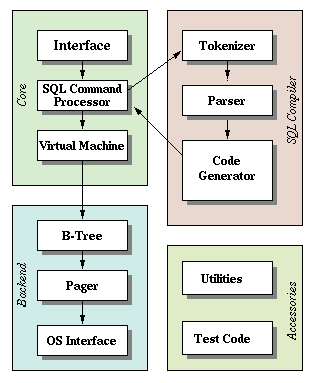
<p>In the spirit of cstack’s original post, I’ll include the SQLite Architecture
diagram as referenced at https://www.sqlite.org/arch.html.</p>

<p><img src="https://cstack.github.io/db_tutorial/assets/images/arch2.gif" alt="sqlite architecture" /></p>]]></content><author><name>Carter Burn</name></author><category term="database" /><category term="sqlite-series" /><category term="foundrydb" /><summary type="html"><![CDATA[Hey, all! Back at it again trying to write posts. While I do believe the Roundup posts are great and will hopefully force me to stop coding and write about what I’m doing, I wanted to come up with a solid series of developing something from scratch. I’ve been intrigued by databases and their internals for awhile now and one of the more fascinating posts that I have read about database internals is from cstack on Github. That tutorial walks you through making a minimal sqlite clone in C. I have written a fair bit of C in my time (refer back to the about page on offensive security tools, they are predominantly in C) and even started working through the code but I eventually plateaued and stopped working through it. I thought a way to motivate me to get through it and really learn was to write that clone in Rust with all of the challenges of the borrow checker, ownership, and the like.]]></summary></entry><entry><title type="html">Part 1 - SQLite Introduction and Setting up the REPL in fdb</title><link href="http://blog.burnthe.dev/foundrydb-part1/" rel="alternate" type="text/html" title="Part 1 - SQLite Introduction and Setting up the REPL in fdb" /><published>2026-04-09T00:00:00+00:00</published><updated>2026-04-09T00:00:00+00:00</updated><id>http://blog.burnthe.dev/foundrydb-part1</id><content type="html" xml:base="http://blog.burnthe.dev/foundrydb-part1/"><![CDATA[<p>Welcome to Part 1! Here, we’ll quickly talk about the broad overview of SQLite’s
internals (and the database we’ll make!) and then setup a basic
Read-Eval-Print-Loop (REPL) for the binary in our project <code class="language-plaintext highlighter-rouge">fdb</code>.</p>

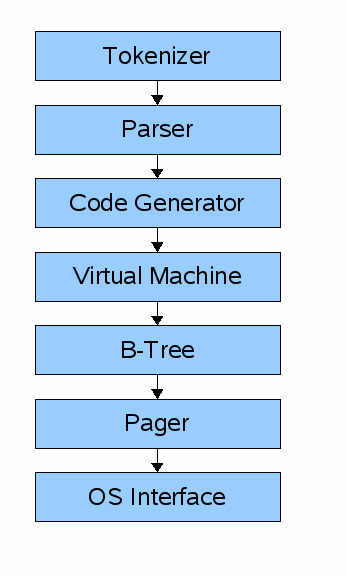
<p>The general “flow” for a SQLite query looks like this:</p>

<p><img src="https://cstack.github.io/db_tutorial/assets/images/arch1.gif" alt="SQLite Architecture" /></p>

<p>Paraphrasing part 1 of cstack’s series, the first step in executing some SQL
against a SQLite database is to make the API call (in the SQLite library) with
your SQL statement. That statement first hits the “frontend” of the engine which
includes the <strong>tokenizer</strong>, <strong>parser</strong>, and <strong>code generator</strong>. Basically, this classic
Computer Science compiler theory by taking the SQL string, turning it into a
series of <strong>tokens</strong>, letting the <strong>parser</strong> make sense of those tokens (based on the
semantics of the language), and then <strong>generate</strong> some bytecode to be ran in a
virtual machine. Another option after the parser is to do what’s known as a
<strong>tree-walking interpreter</strong> where you just walk the Abstract Syntax Tree that the
parser creates. This is usually <em>easier</em> to conceptualize and code but it does
typically affect performance since its really just a large recursive function
that creates a massive stack frame along the way. We’ll follow the original
design and generate bytecode.</p>

<blockquote>
  <p>Side note: I feel fairly comfortable with this step due to David Beasley’s
excellent “Write a Compiler” <a href="https://www.dabeaz.com/compiler.html">course</a>.
Sadly, it’s no longer being offerred, but it was a great way to really dive
into the depths of compiler design and theory. (Side note to the side note: I
am not claiming I could write a tokenizer and parser for the entirety of the
SQL grammer but the small subset we’ll do here, I think I can handle because
of this course).</p>
</blockquote>

<p>After we have bytecode generated, the next step is to hit the backend which
consists of the <strong>virutal machine</strong>, <strong>B-tree</strong>, <strong>pager</strong>, and <strong>OS
interface</strong>. The <strong>virtual machine</strong> will take the generated bytecode and
perform operations on the B-tree data structures that make up the tables and
indices of the database. When it comes down to it, it’s just a giant <code class="language-plaintext highlighter-rouge">match</code>
(not <code class="language-plaintext highlighter-rouge">switch</code> in Rust!) statement that takes action based on the instruction.</p>

<p>Once the <strong>virtual machine</strong> executes those operations, it hits the <strong>B-tree</strong>. The
<strong>B-tree</strong> is truly the defining aspect of SQLite. The <strong>B-tree</strong> has many nodes
that are each a page in length and this layer can retrieve pages from disk or
write to disk by issuing commands to the <strong>pager</strong>.</p>

<p>The <strong>pager</strong> receives commands from the <strong>B-tree</strong> to read or write pages of
data to the database file. The main function here is to properly write these
pages to the correct offset in the database file and keep a cache of recently
accessed pages in memory to make access quick and decide when to write them back
to disk.</p>

<p>The <strong>pager</strong> then interfaces with the <strong>OS interface</strong> for the actual reading
and writing of files. SQLite also calls this the “Virtual File System” or VFS to
provide a generic API for opening, reading, writing, and closing files (and more!).
The <strong>OS interface</strong> then implements the actual mechanisms for the OS that the 
database is running on (like Windows or Unix). cstack’s original tutorial
skipped over this portion to not have to support multiple platforms but luckily
in this tutorial, if we just leverage the Rust standard library <code class="language-plaintext highlighter-rouge">std::fs</code>
module, we get cross-platform support for free!</p>

<h2 id="making-the-repl-for-fdb">Making the REPL for fdb</h2>
<p>cstack’s original post details the basic REPL which requires a decent more
amount of work than in Rust. cstack clearly appreciates good design upfront and
created a C struct for an input buffer to reuse an allocation. This is where C
is a fantastic language but clearly dated and doesn’t have a lot of the
niceties of a modern language like Rust. We’ll go on our own here to make the
simple REPL which just accepts input from the user and only recognizes the
‘.exit’ command.</p>

<p>Taking from cstack’s tutorial, this is the basic usage of <code class="language-plaintext highlighter-rouge">sqlite3</code> from the
command line:</p>

<div class="language-bash highlighter-rouge"><div class="highlight"><pre class="highlight"><code><span class="nv">$ </span>sqlite3
SQLite version 3.34.1 2021-01-20 14:10:07
Enter <span class="s2">".help"</span> <span class="k">for </span>usage hints.
Connected to a transient <span class="k">in</span><span class="nt">-memory</span> database.
Use <span class="s2">".open FILENAME"</span> to reopen on a persistent database.
sqlite&gt; create table <span class="nb">users</span> <span class="o">(</span><span class="nb">id </span>int, username varchar<span class="o">(</span>255<span class="o">)</span>, email varchar<span class="o">(</span>255<span class="o">))</span><span class="p">;</span>
sqlite&gt; .tables
<span class="nb">users
</span>sqlite&gt; .exit
<span class="err">$</span>
</code></pre></div></div>

<p>We’ll get to the point where we have something similar at the end of this post
(minus the <code class="language-plaintext highlighter-rouge">create table</code> line).</p>

<p>Of course there are great crates out there to build elegant REPL’s such as
<code class="language-plaintext highlighter-rouge">rustyline</code> (which gives you tab completion and history!) but we’ll do it the
hard way in this tutorial!</p>

<p>We want to read from <code class="language-plaintext highlighter-rouge">stdin</code> line-by-line, so we’ll use the standard library’s
<code class="language-plaintext highlighter-rouge">BufRead</code> trait to expose <code class="language-plaintext highlighter-rouge">read_line()</code> for easy reading. Of note, you first
have to get a handle to <code class="language-plaintext highlighter-rouge">stdin</code> by locking it from other threads:</p>

<div class="language-rust highlighter-rouge"><div class="highlight"><pre class="highlight"><code><span class="k">use</span> <span class="nn">std</span><span class="p">::</span><span class="nn">io</span><span class="p">::{</span><span class="k">self</span><span class="p">,</span> <span class="n">stdin</span><span class="p">,</span> <span class="n">BufRead</span><span class="p">,</span> <span class="n">Write</span><span class="p">};</span>

<span class="k">fn</span> <span class="nf">main</span><span class="p">()</span> <span class="k">-&gt;</span> <span class="nb">Result</span><span class="o">&lt;</span><span class="p">(),</span> <span class="nn">io</span><span class="p">::</span><span class="n">Error</span><span class="o">&gt;</span> <span class="p">{</span>
    <span class="k">let</span> <span class="k">mut</span> <span class="n">stdin</span> <span class="o">=</span> <span class="nf">stdin</span><span class="p">()</span><span class="nf">.lock</span><span class="p">();</span>
    <span class="k">let</span> <span class="k">mut</span> <span class="n">buffer</span> <span class="o">=</span> <span class="nn">String</span><span class="p">::</span><span class="nf">new</span><span class="p">();</span>

    <span class="k">loop</span> <span class="p">{</span>
        <span class="c1">// print out the prompt and flush the buffer to ensure it prints</span>
        <span class="nd">print!</span><span class="p">(</span><span class="s">"fdb &gt; "</span><span class="p">);</span>
        <span class="nn">io</span><span class="p">::</span><span class="nf">stdout</span><span class="p">()</span><span class="nf">.flush</span><span class="p">()</span><span class="o">?</span><span class="p">;</span>

        <span class="c1">// clear the String </span>
        <span class="n">buffer</span><span class="nf">.clear</span><span class="p">();</span>
        <span class="c1">// read a line from stdin</span>
        <span class="k">let</span> <span class="n">_</span> <span class="o">=</span> <span class="n">stdin</span><span class="nf">.read_line</span><span class="p">(</span><span class="o">&amp;</span><span class="k">mut</span> <span class="n">buffer</span><span class="p">);</span>
        <span class="c1">// print it back out</span>
        <span class="nd">println!</span><span class="p">(</span><span class="s">"{}"</span><span class="p">,</span> <span class="n">buffer</span><span class="nf">.trim</span><span class="p">());</span>
    <span class="p">}</span>

    <span class="nf">Ok</span><span class="p">(())</span>
<span class="p">}</span>
</code></pre></div></div>

<p>This is a simple REPL that does nothing but print the input back to the
user. I added comments in the blog post to explain some things in depth if you
are newer to Rust. One note: I decided for <code class="language-plaintext highlighter-rouge">main</code> to return a 
<code class="language-plaintext highlighter-rouge">Result&lt;(), io::Error&gt;</code> which basically means we can propagate <code class="language-plaintext highlighter-rouge">Error</code>’s up to
<code class="language-plaintext highlighter-rouge">main</code> and print the message to the terminal on an unrecoverable <code class="language-plaintext highlighter-rouge">Error</code>. Other
than that, the code should be self-explanatory here.</p>

<p>Instead of just reading a line and printing it, now we want to take some action
based on that. In SQLite, there are two main ways to interact. There are “.”
commands which are non-SQL “meta” commands to get information from the database.
Of these, <code class="language-plaintext highlighter-rouge">.exit</code> is probably the easiest, it just exits the process. The other
commands are standard SQL commands that we’ll tackle later. The SQL statements
will be the bulk of our focus with the tokenizer, parser, etc. For now, we’ll
just support <code class="language-plaintext highlighter-rouge">.exit</code> to get the REPL started.</p>

<p>In Rust, the easiest approach will be to use the <code class="language-plaintext highlighter-rouge">read_line</code> method on the <code class="language-plaintext highlighter-rouge">BufRead</code>
trait which has a signature of:
<code class="language-plaintext highlighter-rouge">fn read_line(&amp;mut self, buf: &amp;mut String) -&gt; Result&lt;usize&gt;</code>. We’ll have to
handle the <code class="language-plaintext highlighter-rouge">Result</code>. <code class="language-plaintext highlighter-rouge">Ok(0)</code> means EOF (i.e. the input has been closed from a 
Ctrl-C or Ctrl-D). <code class="language-plaintext highlighter-rouge">Ok(n)</code> means <code class="language-plaintext highlighter-rouge">n</code> bytes were read into the buffer. This will
include the newline at the end of the line, so we’ll use <code class="language-plaintext highlighter-rouge">trim()</code> to remove all
leading and trailing whitespace. Any <code class="language-plaintext highlighter-rouge">Err</code> on the <code class="language-plaintext highlighter-rouge">Result</code> will be propagated
through and exit the process.</p>

<p>Then, we’ll match on the input and select our action based on that. To keep
<code class="language-plaintext highlighter-rouge">main</code> minimal (a personal goal of mine), we’ll write a helper function to
perform the command matching.</p>

<p>We’ll start with the modified minimal main loop that will change after
<code class="language-plaintext highlighter-rouge">buffer.clear()</code>:</p>

<div class="language-rust highlighter-rouge"><div class="highlight"><pre class="highlight"><code>        <span class="c1">// -- SNIP --</span>
        <span class="k">match</span> <span class="n">stdin</span><span class="nf">.read_line</span><span class="p">(</span><span class="o">&amp;</span><span class="k">mut</span> <span class="n">buffer</span><span class="p">)</span> <span class="p">{</span>
            <span class="nf">Ok</span><span class="p">(</span><span class="mi">0</span><span class="p">)</span> <span class="k">=&gt;</span> <span class="p">{</span>
                <span class="c1">// EOF; just return (no error)</span>
                <span class="k">return</span> <span class="nf">Ok</span><span class="p">(());</span>
            <span class="p">}</span>
            <span class="nf">Ok</span><span class="p">(</span><span class="n">_n</span><span class="p">)</span> <span class="k">=&gt;</span> <span class="p">{</span>
                <span class="c1">// process the command</span>
                <span class="nf">process_command</span><span class="p">(</span><span class="n">buffer</span><span class="nf">.trim</span><span class="p">());</span>
            <span class="p">}</span>
            <span class="nf">Err</span><span class="p">(</span><span class="n">e</span><span class="p">)</span> <span class="k">=&gt;</span> <span class="p">{</span>
                <span class="c1">// print error and return it</span>
                <span class="nd">eprintln!</span><span class="p">(</span><span class="s">"Error while reading input: {e:?}"</span><span class="p">);</span>
                <span class="k">return</span> <span class="nf">Err</span><span class="p">(</span><span class="n">e</span><span class="p">);</span>
            <span class="p">}</span>
        <span class="p">}</span>
</code></pre></div></div>

<p>Then, with <code class="language-plaintext highlighter-rouge">process_command</code>, we will just convert the input to all lowercase
(to make matching case insensitive) and only take action based on the command.
(Here, we could have returned something like a Result and taken action in <code class="language-plaintext highlighter-rouge">main</code>
but instead we’ll just handle everything here and treat <code class="language-plaintext highlighter-rouge">process_command</code> as
almost like an inline function).</p>

<div class="language-rust highlighter-rouge"><div class="highlight"><pre class="highlight"><code><span class="k">fn</span> <span class="nf">process_command</span><span class="p">(</span><span class="n">cmd</span><span class="p">:</span> <span class="o">&amp;</span><span class="nb">str</span><span class="p">)</span> <span class="p">{</span>
    <span class="k">let</span> <span class="n">cmd</span> <span class="o">=</span> <span class="n">cmd</span><span class="nf">.to_lowercase</span><span class="p">();</span>
    <span class="k">match</span> <span class="n">cmd</span><span class="nf">.as_str</span><span class="p">()</span> <span class="p">{</span>
        <span class="s">".exit"</span> <span class="k">=&gt;</span> <span class="p">{</span>
            <span class="c1">// Exit with success</span>
            <span class="nd">eprintln!</span><span class="p">(</span><span class="s">"Goodbye!"</span><span class="p">);</span>
            <span class="nn">std</span><span class="p">::</span><span class="nn">process</span><span class="p">::</span><span class="nf">exit</span><span class="p">(</span><span class="mi">0</span><span class="p">);</span>
        <span class="p">}</span>
        <span class="n">_</span> <span class="k">=&gt;</span> <span class="p">{</span>
            <span class="nd">println!</span><span class="p">(</span><span class="s">"Unrecognized command: {cmd}"</span><span class="p">);</span>
        <span class="p">}</span>
    <span class="p">}</span>
<span class="p">}</span>
</code></pre></div></div>

<p>Pretty simple. We make another allocation (sadly) to make the command lowercase
and then match on the <code class="language-plaintext highlighter-rouge">&amp;str</code> of that lowercase string. If the buffer has
<code class="language-plaintext highlighter-rouge">.exit</code>, we exit the application. Everything else we treat as an unrecognized
command and print that to the user.</p>

<p>And that’s it! 41 lines and we have a basic REPL for <code class="language-plaintext highlighter-rouge">fdb</code>. Here’s the entire
code at this moment:</p>

<div class="language-rust highlighter-rouge"><div class="highlight"><pre class="highlight"><code><span class="k">use</span> <span class="nn">std</span><span class="p">::</span><span class="nn">io</span><span class="p">::{</span><span class="k">self</span><span class="p">,</span> <span class="n">stdin</span><span class="p">,</span> <span class="n">BufRead</span><span class="p">,</span> <span class="n">Write</span><span class="p">};</span>

<span class="k">fn</span> <span class="nf">main</span><span class="p">()</span> <span class="k">-&gt;</span> <span class="nb">Result</span><span class="o">&lt;</span><span class="p">(),</span> <span class="nn">io</span><span class="p">::</span><span class="n">Error</span><span class="o">&gt;</span> <span class="p">{</span>
    <span class="k">let</span> <span class="k">mut</span> <span class="n">stdin</span> <span class="o">=</span> <span class="nf">stdin</span><span class="p">()</span><span class="nf">.lock</span><span class="p">();</span>
    <span class="k">let</span> <span class="k">mut</span> <span class="n">buffer</span> <span class="o">=</span> <span class="nn">String</span><span class="p">::</span><span class="nf">new</span><span class="p">();</span>

    <span class="k">loop</span> <span class="p">{</span>
        <span class="nd">print!</span><span class="p">(</span><span class="s">"fdb &gt; "</span><span class="p">);</span>
        <span class="nn">io</span><span class="p">::</span><span class="nf">stdout</span><span class="p">()</span><span class="nf">.flush</span><span class="p">()</span><span class="o">?</span><span class="p">;</span>

        <span class="n">buffer</span><span class="nf">.clear</span><span class="p">();</span>

        <span class="k">match</span> <span class="n">stdin</span><span class="nf">.read_line</span><span class="p">(</span><span class="o">&amp;</span><span class="k">mut</span> <span class="n">buffer</span><span class="p">)</span> <span class="p">{</span>
            <span class="nf">Ok</span><span class="p">(</span><span class="mi">0</span><span class="p">)</span> <span class="k">=&gt;</span> <span class="p">{</span>
                <span class="c1">// EOF; just return (no error)</span>
                <span class="k">return</span> <span class="nf">Ok</span><span class="p">(());</span>
            <span class="p">}</span>
            <span class="nf">Ok</span><span class="p">(</span><span class="n">_n</span><span class="p">)</span> <span class="k">=&gt;</span> <span class="p">{</span>
                <span class="nf">process_command</span><span class="p">(</span><span class="n">buffer</span><span class="nf">.trim</span><span class="p">());</span>
            <span class="p">}</span>
            <span class="nf">Err</span><span class="p">(</span><span class="n">e</span><span class="p">)</span> <span class="k">=&gt;</span> <span class="p">{</span>
                <span class="nd">eprintln!</span><span class="p">(</span><span class="s">"Error while reading input: {e:?}"</span><span class="p">);</span>
                <span class="k">return</span> <span class="nf">Err</span><span class="p">(</span><span class="n">e</span><span class="p">);</span>
            <span class="p">}</span>
        <span class="p">}</span>
    <span class="p">}</span>
<span class="p">}</span>

<span class="k">fn</span> <span class="nf">process_command</span><span class="p">(</span><span class="n">cmd</span><span class="p">:</span> <span class="o">&amp;</span><span class="nb">str</span><span class="p">)</span> <span class="p">{</span>
    <span class="k">let</span> <span class="n">cmd</span> <span class="o">=</span> <span class="n">cmd</span><span class="nf">.to_lowercase</span><span class="p">();</span>
    <span class="k">match</span> <span class="n">cmd</span><span class="nf">.as_str</span><span class="p">()</span> <span class="p">{</span>
        <span class="s">".exit"</span> <span class="k">=&gt;</span> <span class="p">{</span>
            <span class="c1">// Exit with success</span>
            <span class="nd">eprintln!</span><span class="p">(</span><span class="s">"Goodbye!"</span><span class="p">);</span>
            <span class="nn">std</span><span class="p">::</span><span class="nn">process</span><span class="p">::</span><span class="nf">exit</span><span class="p">(</span><span class="mi">0</span><span class="p">);</span>
        <span class="p">}</span>
        <span class="n">_</span> <span class="k">=&gt;</span> <span class="p">{</span>
            <span class="nd">println!</span><span class="p">(</span><span class="s">"Unrecognized command: {cmd}"</span><span class="p">);</span>
        <span class="p">}</span>
    <span class="p">}</span>
<span class="p">}</span>
</code></pre></div></div>

<p>That’s it for now! Next time, we’ll work on the SQL compiler and virtual
machine.</p>

<h2 id="series">Series</h2>
<p>This section contains the order of the series for easier navigation.</p>

<table>
  <thead>
    <tr>
      <th style="text-align: center">Previous Article</th>
      <th style="text-align: center">Next Article</th>
    </tr>
  </thead>
  <tbody>
    <tr>
      <td style="text-align: center"><a href="/foundrydb-intro">Intro</a></td>
      <td style="text-align: center"><strong>Coming Soon!</strong></td>
    </tr>
  </tbody>
</table>]]></content><author><name>Carter Burn</name></author><category term="database" /><category term="sqlite-series" /><category term="foundrydb" /><summary type="html"><![CDATA[Welcome to Part 1! Here, we’ll quickly talk about the broad overview of SQLite’s internals (and the database we’ll make!) and then setup a basic Read-Eval-Print-Loop (REPL) for the binary in our project fdb.]]></summary></entry><entry><title type="html">Roundup - April 9th</title><link href="http://blog.burnthe.dev/roundup/" rel="alternate" type="text/html" title="Roundup - April 9th" /><published>2026-04-09T00:00:00+00:00</published><updated>2026-04-09T00:00:00+00:00</updated><id>http://blog.burnthe.dev/roundup</id><content type="html" xml:base="http://blog.burnthe.dev/roundup/"><![CDATA[<p>Hello! I am beginning one of my brain dump/minimal review/minimal edits posts
with this one! I’m going to call this series “roundup” where I just give a quick
few notes on where I’m at with any personal projects. The focus of this roundup
is the Raft sans-i/o implementation.</p>

<h2 id="where-were-we">Where were we?</h2>
<p>With Raft, I had successfully gotten to the point where I could replicate log
entries across the cluster (in a sans-i/o way). This worked great and really
could have been a ‘stopping’ point to start moving to integrating a higher-level
event loop and then an application like a key-value store on top of it. The one
problem: unbounded log growth. I didn’t support log compaction and snapshotting
in that implementation and that is fine for an academic project of learning the
internals of Raft but for anything that wanted to even have the chance to be
offerred up for production use needed to have log compaction. So, I started to
go down that road.</p>

<h2 id="what-happened">What happened?</h2>
<p>My initial thoughts were to put the work on the application and event loop. To
be fair, I’m still doing that, but I had to change <code class="language-plaintext highlighter-rouge">RaftCore</code> (the type that
represents a Raft node). The idea with this library is that <code class="language-plaintext highlighter-rouge">RaftCore</code> simply owns
the Raft protocol itself. It accepts minimal input from the event loop (like
propose a new command) and emits Action’s for the event loop to take such as
<code class="language-plaintext highlighter-rouge">SendMessage</code>, <code class="language-plaintext highlighter-rouge">ApplyToStateMachine</code>, <code class="language-plaintext highlighter-rouge">Persist*</code>. The paper even calls out that the
snapshot semantics for Raft is up to the application itself.</p>

<p>That makes sense to me because Raft can be used as the consensus layer for a
number of applications like key value stores, databases, or even a simple
counter you want replicated. Raft doesn’t need to know what the application
cares about (which is also why Raft stores a command as a <code class="language-plaintext highlighter-rouge">Vec&lt;u8&gt;</code>; just a
serialized blob of whatever the application wants to store).</p>

<p>This means the design will be on the application to tell <code class="language-plaintext highlighter-rouge">RaftCore</code> “hey, it’s
time to snapshot”. The application can decide when that is the case (maybe a
certain number of new entries in a key value store). I plan to also provide some
helper functions for the event loop and application to peek at how large the
<code class="language-plaintext highlighter-rouge">RaftCore</code> log is at any moment. So now most of the snapshotting will be on the
application with this design.</p>

<blockquote>
  <p>Yeah, I totally am punting the problem down the road.</p>
</blockquote>

<p>What <code class="language-plaintext highlighter-rouge">RaftCore</code> did need to change, though, was tracking whether or not a snapshot
exists. The idea is that if a leader has a follower that is sufficiently behind,
the leader may need to go all the way back to the snapshot for the follower to
catch up.</p>

<blockquote>
  <p>This, also, suggests to me that more frequent snapshotting is better so that
the log in <code class="language-plaintext highlighter-rouge">RaftCore</code> stays sufficiently bounded and the amount of time for
“catchup” can be minimized in one fell swoop with a snapshot.</p>
</blockquote>

<p>With that, now <code class="language-plaintext highlighter-rouge">RaftCore</code> needed to track the last index within the snapshot.
That’s fine, but the nodes are still going to work on the monotonically
increasing “index” of the log and not necessarily worry about the index
<em>within</em> <code class="language-plaintext highlighter-rouge">RaftCore.log</code>. Now, we’re working on “virtual” or “logical” indices
instead of “physical” indices in the RaftCore log.</p>

<p>Should be easy right? Just subtract the last index in the snapshot from the
index provided and voila, you have the index in <code class="language-plaintext highlighter-rouge">RaftCore.log</code>. Well, it wasn’t that
simple because I had chosen to add a sentinel or ‘dummy’ entry at the start of
every node’s log that was on term 0. That made indexing really easy within
RaftCore because I could just directly reference the index passed (i.e. index 1
in the logical Raft log was <em>actually</em> at index 1 in <code class="language-plaintext highlighter-rouge">RaftCore.log</code>). The issue I
found was that once the node had a snapshot, all the index math was off. An
example may help…</p>

<p>Say I have a Raft log that has 102 entries. And I snapshotted up to and
including index 100 in the log. That means the last included index in the
snapshot would be set to 100 and <code class="language-plaintext highlighter-rouge">RaftCore</code>’s log would be something like:
<code class="language-plaintext highlighter-rouge">[{index: 101, term: 3}, {index: 102, term: 3}]</code> (note, the index isn’t actually
stored in the entries of the log, but just for demonstrative purposes here). Say
I wanted index 101 in the Raft log to provide a follower. The old math / simple
math talked about would have been <code class="language-plaintext highlighter-rouge">index - last_included_index</code>, which in this
case is: <code class="language-plaintext highlighter-rouge">101 - 100 = 1</code> but then I wouldn’t be able to go to <code class="language-plaintext highlighter-rouge">RaftCore.log[1]</code>
because that’s index 102 in the Raft log! All the index math I was doing was
fine until snapshots came up.</p>

<p>So, with great sadness, I added some helpers to do the math and removed the
sentinel entry to make sure it was consistent math regardless if there was a
snapshot or not. Then, I changed up any direct indexing into the log to use
the helpers and ensured I wasn’t using <code class="language-plaintext highlighter-rouge">RaftCore.log.len()</code> as a way to compute
the “last” index in the log and rather use the helper that took into account
the snapshot’s log. This created a lot of problems at first (I actually had over
half of the tests failing). Guess what the bulk of the problems were? You
probably guessed it, off-by-one errors. I had a lot of places where a <code class="language-plaintext highlighter-rouge">&lt;</code> should
have been a <code class="language-plaintext highlighter-rouge">&lt;=</code> or I missed appending <code class="language-plaintext highlighter-rouge">-1</code> to a computation. I ended up adding
in tests for the helpers too to make sure my sanity was correct (Claude made the
suggestion after watching the struggle). Eventually, I cleared out those issues
and <em>hopefully</em> tested all of the edge cases and have this ready to go.</p>

<p>The funny part is that this change that took a good chunk of time didn’t really
do anything beyond just using the helpers. Snapshotting and log compaction is
still NOT supporting in <code class="language-plaintext highlighter-rouge">RaftCore</code> but all of the scaffolding is there to make
it ready!</p>

<h2 id="where-next">Where next?</h2>
<p>Next will be to actually do log compaction and snapshotting between the nodes.
I’ll iron out the API between the application, event loop, and <code class="language-plaintext highlighter-rouge">RaftCore</code> and
hopefully will write some solid tests that ensure the Raft protocol is still
upheld when I added in the snapshots.</p>

<p>After that, I think the last piece I’ll tackle is cluster membership changes.
I haven’t dove super deep into it in the paper but have learned and guessed that
that is one of the harder problems within Raft. I may also pause on that for the
moment and work on the higher levels (getting through to a key value store).
However, I won’t consider this project ready for “production” until cluster
membership changes can be supported. Raft is great until you can’t manipulate
the cluster when you start to realize you need more replication to tolerate more
failures.</p>

<blockquote>
  <p>I’m using the term “production” loosely because I have no idea if this would
be considered for production use. I’ll use it maybe to test on real AWS nodes,
but I doubt anyone will want to use this.</p>
</blockquote>

<p>That’s all for now! The next roundup should have log compaction done!</p>

<h3 id="roundup-series">Roundup Series</h3>
<p>In this section of the Roundup’s, I’ll post the “series” so you can cycle
through!</p>

<table>
  <thead>
    <tr>
      <th style="text-align: center">Previous Roundup</th>
      <th style="text-align: center">Next Roundup</th>
    </tr>
  </thead>
  <tbody>
    <tr>
      <td style="text-align: center"><strong>NONE!</strong></td>
      <td style="text-align: center"><strong>Coming Soon!</strong></td>
    </tr>
  </tbody>
</table>]]></content><author><name>Carter Burn</name></author><category term="roundup" /><category term="raft" /><summary type="html"><![CDATA[Hello! I am beginning one of my brain dump/minimal review/minimal edits posts with this one! I’m going to call this series “roundup” where I just give a quick few notes on where I’m at with any personal projects. The focus of this roundup is the Raft sans-i/o implementation.]]></summary></entry><entry><title type="html">Hello World</title><link href="http://blog.burnthe.dev/hello-world/" rel="alternate" type="text/html" title="Hello World" /><published>2026-03-30T00:00:00+00:00</published><updated>2026-03-30T00:00:00+00:00</updated><id>http://blog.burnthe.dev/hello-world</id><content type="html" xml:base="http://blog.burnthe.dev/hello-world/"><![CDATA[<p>Hello world from Github Pages!</p>

<p>As seen in the <a href="/about">about</a> page, I set this blog up to start
getting some written content out to the world. The greatest barrier to entry for
me has been trying to capture a “perfect” post and spending so much time getting
a post there that I end up getting distracted and never actually publish it. I
intend to change that with this refreshed site. I’m planning to write about
things I’m currently working on, design decisions, problems, etc. and then just
post it. Minimal editing, minimal review, just brain dump a post and publish it.</p>

<p>I fully recognize the importance of technical writing and blog posts. It would
take me ages to list the countless blog posts that have guided me through
solutions and I hope that my brain dumps can be useful to someone down the line.
If they’re not, then at least this is an attempt to force myself to write
technical content and get it on the Internet.</p>

<h2 id="current-state">Current State</h2>
<p>Another one of my weaknesses with respect to personal projects is my inability
to finish them. I am not going to make any promises that I will do that (or that
this blog will help me finish them).</p>
<blockquote>
  <p>If we’re being honest, is a project ever “done”?!</p>
</blockquote>

<p>Currently, I’m working on implementing the Raft consensus algorithm in Rust. I’m
taking a sans-i/o approach to it and focusing on the algorithm correctness at
the moment. I plan to finish that soon and then write the event loop (where the
I/O will actually start to happen) along with a minimal key-value server on top
of Raft (to give a replicated, fault-tolerant KV store).</p>

<p>I’ve also been messing around with Code Crafters, specifically the Redis
implementation. I actually got up to the point where multiple servers would
interact and that made me switch over to writing the Raft library. I’m not sure
if I’ll combine the two (mostly because I like the idea of a raw KV store
instead of adding the Redis-specific items), but maybe that’ll happen. Check out
my progress so far <a href="https://github.com/carterburn/codecrafters-redis-rust">here</a>.</p>

<p>I’ve also been working on a tunneling tool (there’s those security tools again)
that allows a user to tunnel into a network using a tun device on their host
machine over a QUIC connection. That isn’t public yet because it only supports
TCP tunneling at this point and it doesn’t have tests nor does it provide
security with the self-signed certs. I’m uncertain if I’ll continue that at the
moment, but it is still a fun project I may share in the future.</p>

<p>After I get through Raft, my plan is to try my hand at the Gossip Gloomers
Distributed Systems problems found on <a href="https://fly.io/dist-sys/">fly.io</a>. I had
Claude generate some reading materials to help me through because while I did
take a distributed systems course for my graduate degree, it appears there were
some gaps in that course. I’ll definitely blog about those challenges here.</p>

<h2 id="previous-work">Previous Work</h2>
<p>Two main things to point out as previous Rust work:</p>

<p>1) I wrote a simple crate for a socks5 proxy in Rust. It’s pretty bad, but it
was honestly my first attempt at writing any sort of networking code in Rust
using tokio. You can find it on <a href="https://crates.io/crates/socksprox">crates.io</a>
and the source on <a href="https://github.com/carterburn/socksprox">Github</a>. I have to
say, greater than 3k downloads is still pretty cool, even if that’s a bunch of
crates.io mirrors downloading the crate every once in awhile. 
2) I wrote a userland exec binary in Rust a little bit ago. I called it santa
because it only loads ELF binaries. I drew inspriation from a Python
<a href="https://github.com/anvilsecure/ulexecve/tree/main">implementation</a>
of userland exec and a Rust <a href="https://github.com/io12/userland-execve-rust/tree/main">one</a>. 
This is another one of those security tools that allows someone to load up a 
binary inside an existing process’s memory (santa itself) without having
the kernel do it. It can load binaries from files, stdin, or from a remote URL.
While writing this blog, I forgot I had to add a few things to the README, so I
sent Claude off to go do that. Check out the repo
<a href="https://github.com/carterburn/santa">here</a>.</p>

<h2 id="quick-word-on-ai-blog-posts-in-2026-must-include">Quick Word on AI (blog posts in 2026 must include)</h2>
<p>In a lot of my projects, I do leverage Claude Code. My approach to using AI,
though, is to use it like a teacher. For example, in my Raft implementation, I
don’t have Claude write any code, I just have it give me “tasks” as if it were
an assignment and then review my work and give me guidance on places I can
improve. I think this has worked well for me because it allows me to ensure I
understand what I’m writing and forces me to write idiomatic code. I think it’s
making me better without relying too much on Claude to write the code for me. I
definitely recognize the time and place to have Claude do that work and have
considered a few projects to let Claude go do its thing, but I do fear if I do
that too frequently, I miss out on the opportunity to truly learn and then won’t
be able to effectively use AI coding assistants. The power of an AI coding
assistant is when the human can effectively guide (and check) the assistant,
which requires deep understanding of the topic at hand. I need to get to that
point first, so I use Claude as my personal teacher (because I don’t really have
one).</p>

<p>Hopefully this is a blog that will interest you! We’ll see how it goes. Until
next time!</p>]]></content><author><name>Carter Burn</name></author><category term="intro" /><summary type="html"><![CDATA[Hello world from Github Pages!]]></summary></entry></feed>